tulip agents · the workbench
Workbench
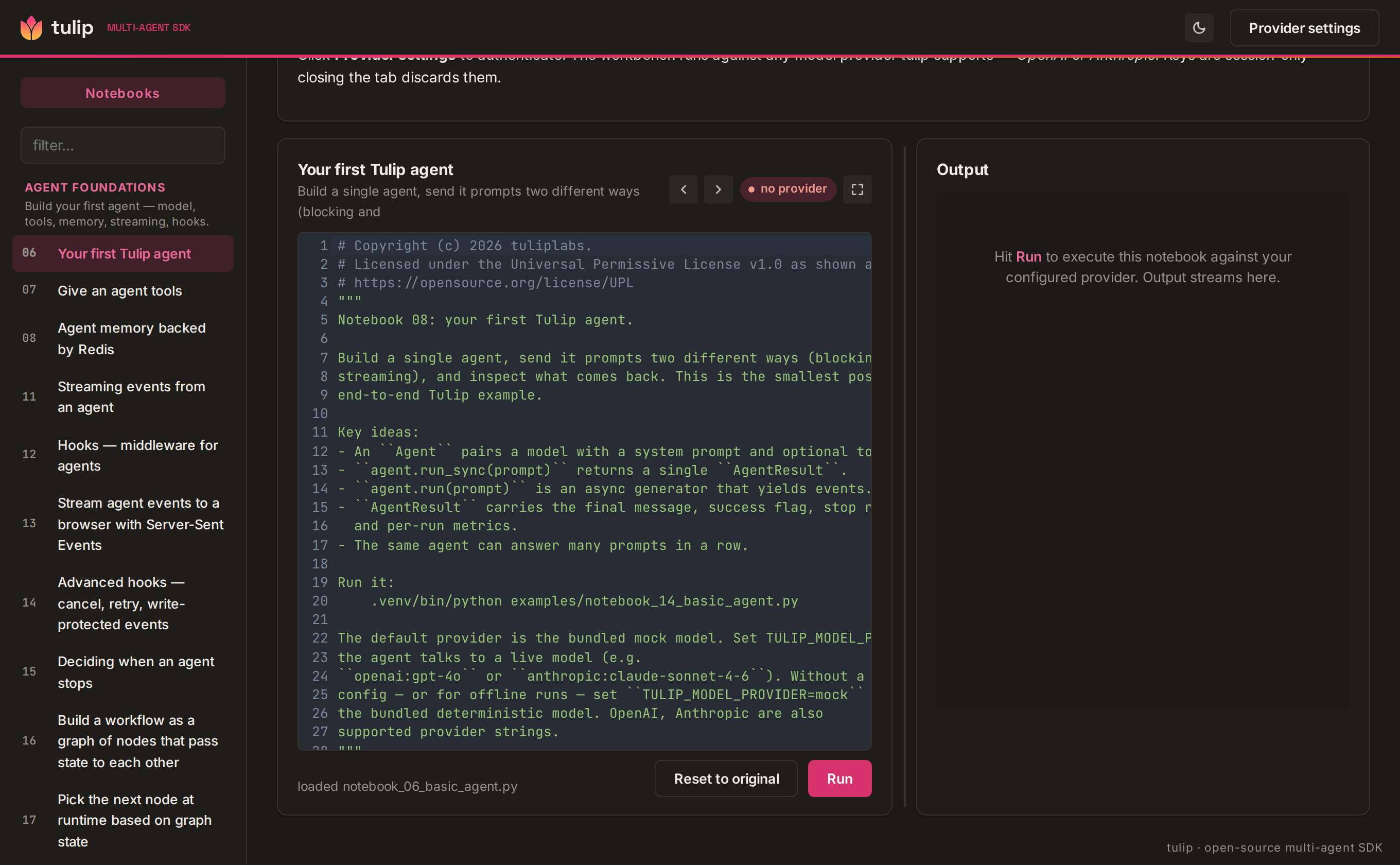
A playground for every Tulip pattern — pick one, paste your own provider key, hit Run, and watch a real agent stream events back. Use it two ways: on the web (zero setup, runs in your browser) or locally in Docker (server-side execution against real backends).
Bring your own model key — OpenAI, Anthropic, or any OpenAI-compatible endpoint (vLLM, Together, LiteLLM) via an optional base URL. We host the UI, not the inference: your key is sent per request and never stored server-side.
Open the hosted workbench Get the SDK
What it is
The workbench is the fastest way to see what the Tulip SDK does
without writing any code. It's a single-page UI in front of
every canonical Tulip pattern — a basic agent, an agent with tools, a
structured-output schema, an orchestrator with specialists, a
sequential pipeline, a map-reduce fan-out, a critic loop with
allow_cycles. Each pattern is wired to a real Python coroutine
that imports the SDK, builds the agent, and streams events through to
your browser.
Start with the foundations
The catalog leads with the Agent Foundations category — a basic agent, an agent with tools, conversation memory, streaming, and lifecycle hooks. Pick any one, hit Run, and watch the typed event stream render live.
The notebook sidebar surfaces the full learning path: graphs & composition, multi-agent shapes, reasoning, RAG, skills/plugins, production patterns, and end-to-end workflows.
Two execution modes, same UI. On the web, notebooks run in your browser via Pyodide (CPython compiled to WebAssembly) — nothing executes on our servers, and your key goes straight from the tab to your provider. Run it locally and notebooks execute server-side in the container, with the full Python runtime, threads, and real databases.
| On the web | Locally (Docker) | |
|---|---|---|
| Setup | none — open a URL | docker run / docker compose |
| Where code runs | your browser (Pyodide/WASM) | the container (real CPython) |
Threads / run_sync |
no (async only) | yes |
| Storage | in-memory only | real Qdrant / pgvector / Redis |
| Notebooks that run | ~70 of 74 | all of them |
| Your API key | stays in the tab | stays on your machine |
| Cost to you | $0 | $0 (your machine) |
| Best for | a quick look, sharing a link | full runs, real backends, iterating |
See Use it on the web and Run it locally.
Use it on the web
The zero-setup path — nothing to install.
- Go to play.tulipagents.ai.
- Click Provider settings (top right), pick OpenAI or Anthropic (or any OpenAI-compatible endpoint via a base URL), paste your own key, pick a model, and Save.
- Pick a notebook from the sidebar and hit Run.
Everything runs in your browser: the SDK is installed into a Pyodide (WebAssembly) runtime in the tab, the notebook executes there, and the model call goes straight from your browser to your provider. We never see your key and never run your code on our servers.
A browser tab has no threads, no local files, and only in-memory storage, so a few notebooks show a run-locally notice instead. Today that's three of the seventy-two: A2A protocol (starts a socket server), Skills (loads skill packages from disk), and Multi-modal providers (fetches generated-image bytes from a non-CORS host). Everything else — agents, tools, memory, graphs, multi-agent, reasoning, guardrails, the approval gates, security workflows, and RAG — runs in the browser.
RAG on the web works with an in-memory vector store, but the embeddings step needs a provider that serves an embeddings model:
| Key you bring | Chat notebooks | RAG (embeddings) |
|---|---|---|
| OpenAI | ✅ | ✅ text-embedding-3-small |
| Anthropic | ✅ | ⚠️ skips with a clear "set an OpenAI key" note (no embeddings API) |
| OpenAI-compatible (base URL) | ✅ | ⚠️ only if it serves text-embedding-3-small |
For real vector databases and the four run-locally notebooks, run it locally 👇.
Run it locally
Notebooks execute server-side in the container — real CPython, threads, and (with the full stack) real vector databases and Redis. No source checkout: it's a published, multi-arch image (Intel/AMD + Apple Silicon).
Run it on your own machine
Local mode executes your notebooks as arbitrary server-side code (like a
local Jupyter). The image runs non-root, and the commands below bind it
to 127.0.0.1 only, so it is not reachable from your network. Don't
expose it on a public host with execution enabled.
Single container
Just the workbench (in-memory backends — same as the web, but server-side, so everything except the real-database notebooks runs):
docker run --rm -p 127.0.0.1:3101:3101 ghcr.io/tuliplabs-ai/tulip-workbench:latest
# open http://localhost:3101 → Provider settings → paste a key → Run
Stop with Ctrl-C; --rm removes the container on exit.
Full stack — real vector DB + Redis
To run RAG against a real vector store, Redis-backed memory/checkpoints, and the
notebooks that need durable backends, use the compose stack: the workbench plus
Qdrant, Postgres/pgvector, and Redis. Save this as docker-compose.yml:
name: tulip-workbench

services:
  workbench:
    image: ghcr.io/tuliplabs-ai/tulip-workbench:latest
    pull_policy: always
    # Server-side execution — bound to localhost, no privilege escalation.
    ports: ["127.0.0.1:3101:3101"]
    security_opt: ["no-new-privileges:true"]
    environment:
      WORKBENCH_ALLOW_NOTEBOOK_EXEC: "1"
      QDRANT_URL: "http://qdrant:6333"
      DATABASE_URL: "postgresql://tulip:tulip@postgres:5432/tulip"
      REDIS_URL: "redis://redis:6379/0"
    depends_on:
      postgres: { condition: service_healthy }
      redis: { condition: service_healthy }
      qdrant: { condition: service_started }
    restart: unless-stopped

  qdrant:
    image: qdrant/qdrant:v1.18.3
    volumes: ["qdrant-data:/qdrant/storage"]
    restart: unless-stopped

  postgres:
    image: pgvector/pgvector:pg16
    environment: { POSTGRES_USER: tulip, POSTGRES_PASSWORD: tulip, POSTGRES_DB: tulip }
    configs:
      - { source: pgvector-init, target: /docker-entrypoint-initdb.d/01-pgvector.sql }
    volumes: ["pg-data:/var/lib/postgresql/data"]
    healthcheck:
      test: ["CMD-SHELL", "pg_isready -U tulip -d tulip"]
      interval: 5s
      retries: 20
    restart: unless-stopped

  redis:
    image: redis:7-alpine
    volumes: ["redis-data:/data"]
    healthcheck: { test: ["CMD", "redis-cli", "ping"], interval: 5s, retries: 20 }
    restart: unless-stopped

configs:
  pgvector-init:
    content: "CREATE EXTENSION IF NOT EXISTS vector;\n"

volumes:
  qdrant-data:
  pg-data:
  redis-data:
Then:
The backends aren't exposed on the host (the workbench reaches them internally),
and the tulip/tulip Postgres credentials are local-network only. Notebooks run
server-side and reach the stores by service name — QDRANT_URL,
DATABASE_URL, and REDIS_URL are pre-wired into the container. RAG notebooks
default to the in-memory store; point one at Qdrant or pgvector by swapping the
store line in the editor:
import os
from tulip.rag import QdrantVectorStore, OpenAIEmbeddings, RAGRetriever

store = QdrantVectorStore(url=os.environ["QDRANT_URL"], dimension=1536)
retriever = RAGRetriever(embedder=OpenAIEmbeddings("text-embedding-3-small"), store=store)
(RAG still needs an OpenAI key in Provider settings for the embeddings call — the store is local, the embeddings are not.)
Provider settings
The header's Provider settings modal accepts two shapes:
- OpenAI — paste
sk-…+ pick a model (defaults togpt-4o). - Anthropic — paste
sk-ant-…+ pick a model (defaults toclaude-sonnet-4-6).
Settings live in the page's memory. Closing the tab discards them.
Reopening the page means pasting again. This is intentional: an API key
sitting in localStorage on a shared computer is a leak waiting to
happen.
What you can run
The catalog populates from the BFF's /api/notebooks endpoint, which
walks examples/notebook_*.py. The workbench ships 9 dedicated
FastAPI pattern endpoints:
| Pattern | What it shows |
|---|---|
| Basic agent | One-shot Q&A — hello world for the SDK |
| Agent + tools | ReAct loop with add and reverse tools |
| Structured output | output_schema=Verdict → typed Pydantic result |
| Orchestrator + specialists | Coordinator dispatches to researcher + editor |
| Sequential composition | Two agents chained: researcher → summariser |
| Map-reduce code review | Fan-out to 3 reviewers, reduce findings |
| StateGraph critic loop | Writer → Critic cycle with allow_cycles |
| Long-term memory | Two-session demo — see below |
The rest are the full example notebooks. On the web they run in the browser (Pyodide); locally they run as Python subprocesses against your provider — either way you watch streamed events instead of tailing stdout.
The DeepAgent notebook ships a part5_datastores section that
exercises create_deepagent(datastores={"medical": …}) against an
in-memory RAGRetriever. The same auto-wiring backs the
deep-research project examples — runnable demos that swap the
in-memory store for OpenSearch (or any other Tulip vector store).
The workbench surfaces the in-memory variant in the sidebar; the
multi-backend versions live as standalone project demos in
examples/projects/deep-research/.
Long-term memory pattern
Pick Long-term memory in the sidebar and paste a prompt that reveals something about yourself — your role, a preference, a constraint. The workbench runs two back-to-back agent sessions:
Session 1 processes your prompt and runs LLM-backed extraction to identify durable facts worth keeping. Those facts are persisted to an in-memory store (scoped to the request; cleared between runs).
Session 2 is a fresh agent with no conversation history — only
the injected [Long-term Memory] block. It answers "What do you know
about me?" using only what was stored, demonstrating cross-session
recall without passing any raw history.
Sample prompts that produce interesting memory extraction:
I'm a senior Python engineer working on a compliance-driven auth rewrite.
I prefer short answers and always want real database connections in tests —
no mocks. Can you explain JWT vs session tokens briefly?
I'm a payments ops lead handling refunds and chargebacks. I work in Python and
use Postgres for the ledger. The reconciliation deadline is end of Q2. What's a
good metric for measuring chargeback-dispute win rate?
The reply shows three sections: the Session 1 answer, the extracted memories (key/content pairs), and the Session 2 recall — so you can see exactly what the model chose to remember and how it surfaced in a fresh context.
Cost
You pay $0 to run the workbench itself, either way. On the web it runs in your browser; locally it runs on your own machine (or Docker daemon). The only thing you pay for is the model calls your notebooks make, and those go directly to your provider key (OpenAI / Anthropic). Nothing is billed on our side.
Troubleshooting
- Sidebar is empty — on the web, reload once the page finishes loading the
runtime. Locally, the container takes 10–20 s to start; reload once
http://localhost:3101/api/healthreturns{"ok": true}(or checkdocker logs <container>). - "Provider settings: setup required" never goes away — you closed the modal without hitting Save. Reopen and click Save.
- OpenAI / Anthropic auth fails — double-check the API key in Provider settings. Keys are session-only; reopening the page means pasting again.
- Notebook fails with "no parsed Pydantic" / empty output — your
model is too small for structured output. Use
gpt-4oorclaude-sonnet-4-6for the demos that useoutput_schema.